Desk Setup Essentials I Actually Use for Working From Home
As an Amazon Associate I earn from qualifying purchases. This means if you click a link and make a purchase, I may earn a small commission at no extra cost to you. All opinions are entirely my own.
The Short Version
My desk setup has evolved piece by piece, mostly because I kept finding little problems that needed solving. More screen space. Better organization. A way to keep my laptop connected without taking over the desk. Better audio for calls. Even a lamp that gives me decent light without eating up precious workspace.
These are the eight products currently earning their place on my desk. Some are inexpensive little upgrades. Others are bigger investments. Together, they make working from home more comfortable, organized, and a whole lot more efficient.
Want to see the setup together?
Shop my Desk Setup Essentials collection on Amazon here.
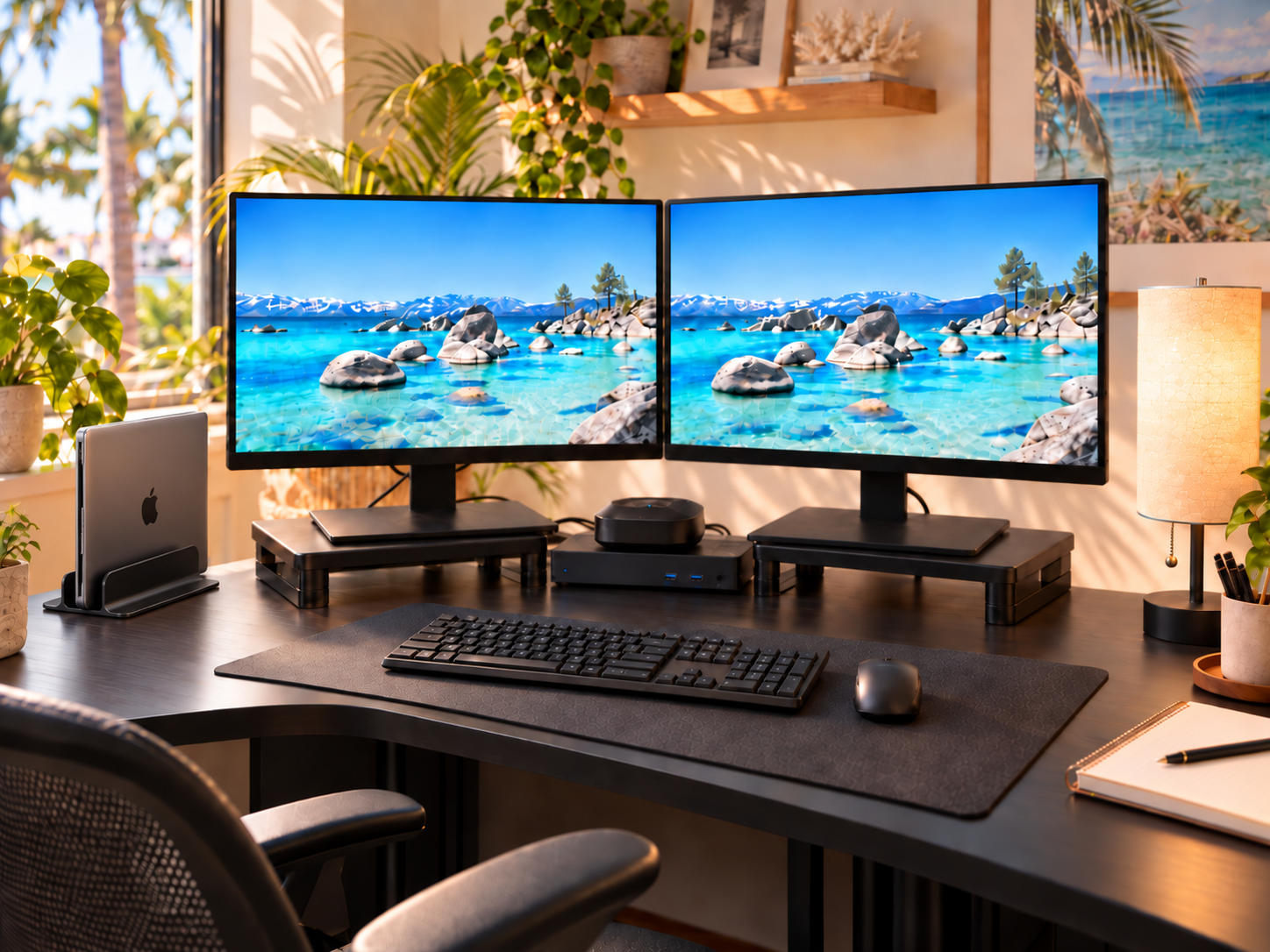
KOORUI 22-Inch Monitors
I resisted dual monitors for way too long. Then I started juggling research, writing, social media, and multiple online businesses at the same time and finally understood why my husband kept telling me I needed two screens. I use two of these KOORUI monitors side by side every day, usually with research on one and whatever I’m creating on the other. After months of six to eight hour workdays, they have been rock solid.
Shop the KOORUI monitor on Amazon.
Read my full KOORUI monitor review.
Amazon Basics Adjustable Monitor Risers
I use a riser under each monitor to bring the screens closer to eye level. They are simple, adjustable, require no tools, and after months of daily use they have stayed steady without wobbling or wearing out. Sometimes the least exciting product on the desk ends up solving one of the biggest problems.
Shop the monitor riser on Amazon.
Read my full monitor riser review.
Plugable USB-C Triple Display Docking Station
This is the quiet workhorse behind everything. My monitors, keyboard, speaker system, and laptop all run through the docking station, which means I can connect everything through one setup instead of rebuilding my desk every time I sit down. It has worked through a move and even a switch from Dell to MacBook without giving me a single real problem.
Shop the Plugable docking station on Amazon.
OMOTON Vertical Laptop Stand
Desk space disappears surprisingly fast when you start adding monitors and accessories. This stand keeps my laptop upright, secure, and connected while getting it off the work surface entirely. It is adjustable, solid, and has worked with several different laptops in our house.
Shop the OMOTON laptop stand on Amazon.
Read my full OMOTON laptop stand review.
Amazon Basics Wireless Mouse
This mouse has been with me for years and still works like it did when I bought it. It lives at my desk most of the time, but it is small enough that I also toss it into my bag when I travel. Reliable, inexpensive, and gloriously boring in the best possible way. It simply works.
Shop the Amazon Basics wireless mouse.
Read my full mouse and keyboard review.
HP 230 Wireless Keyboard
The keyboard has the same story as the mouse. Years of daily use, no drama, and no reason to replace it. The lettering is still crisp, the keys still respond properly, and the wireless setup keeps another cord off my already busy desk.
Shop the HP 230 wireless keyboard.
Read my full mouse and keyboard review.
EMEET M0 Plus Conference Speaker and Microphone
When I switched to a MacBook running through external monitors, I suddenly needed a better solution for calls. This compact speaker and microphone fixed that problem immediately. Mine sits behind the monitor risers, picks up my voice clearly from across the desk, and can run wired through the dock or over Bluetooth.
Shop the EMEET M0 Plus on Amazon.
Read my full EMEET M0 Plus review.
Three-Color Bedside Table Lamp
This little lamp started in a guest bedroom and somehow ended up earning a permanent spot in my office. It gives me three light temperatures, takes up very little space, and even has an outlet built into the base. It is one of those small details that makes the desk feel less like a workstation and more like an actual space I want to sit in.
Shop the lamp on Amazon.
Read my full lamp review.
The Verdict
None of these products landed on my desk because I was trying to create a Pinterest-perfect office. They got there because each one solved something.
The monitors gave me room to work. The risers improved how I sit at the desk. The laptop stand gave me back space. The dock connects everything. The keyboard and mouse have simply refused to die. The EMEET fixed my call setup. And the lamp makes long workdays feel a little less sterile.
Individually, they are useful. Together, they make the whole workspace flow.
Browse all of my Desk Setup Essentials together on my Amazon storefront.
As an Amazon Associate I earn from qualifying purchases. This means if you click a link and make a purchase, I may earn a small commission at no extra cost to you. All opinions are entirely my own.